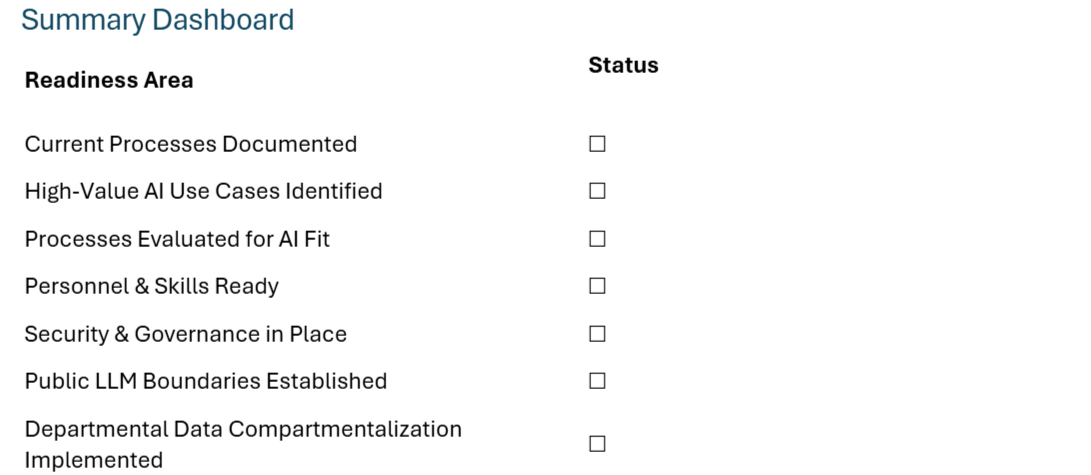
AI Readiness Checklist for NetSuite Users
This checklist helps NetSuite teams determine whether they are prepared to adopt AI tools—both NetSuite-native and external LLMs—securely, efficiently, and with maximum business value.
1. Understand Your Current NetSuite Processes
Before applying AI, map the business processes that depend on NetSuite.
Checklist
Have all major NetSuite workflows been documented?
Procure-to-Pay
Order-to-Cash
Record-to-Report
Inventory Management
Project/Job Costing
CRM & Case Management
Are process owners defined for each module?
Are repetitive or manual steps identified (e.g., data entry, approvals, report creation)?
Do users frequently rely on saved searches or manual Excel exports?
Are error-prone or time-consuming transactions documented (e.g., AP coding, fulfillment, revenue recognition adjustments)?
Are customizations or SuiteScripts documented and understood?
2. Identify Where AI Brings the Most Value in NetSuite
Focus AI efforts on high-impact, data-rich areas.
Checklist
Does the process involve large datasets from records (transactions, customers, items)?
Is there repetitive decision-making (e.g., GL classification, approval routing)?
Would automated summarization or reporting increase efficiency (saved search summaries, dashboards, KPI commentary)?
Is forecasting or anomaly detection helpful (demand planning, cash flow, AP/AR aging risks)?
Would AI-driven recommendations benefit users (upsell suggestions, vendor analysis, classification help)?
Are support, CRM, or case management processes benefiting from AI-driven chat or knowledge search?
3. Evaluate Whether a NetSuite Process Is a Good Fit for AI
Some tasks are ideal candidates; others require caution.
Checklist
A process is a strong candidate if:
It is well-defined and consistent.
Data quality is high (complete, accurate NetSuite records).
AI outcomes can be validated (e.g., recommendation → user review).
Mistakes are low-cost or reversible.
No sensitive client PII or restricted financial data needs to be exposed to external systems.
Output can be monitored and measured for accuracy.
A process may NOT be suitable if:
It contains confidential client or financial data.
Errors could create compliance or audit issues.
There is high variance or exceptions requiring human judgment.
4. Personnel Requirements
AI does not replace people—it augments them. Successful programs require skills in multiple areas.
Checklist
Leadership
Executive sponsor for AI initiatives.
Defined KPIs: cost savings, speed, error reduction, customer experience.
Technical
NetSuite administrator familiar with record structures, saved searches, integrations (SuiteTalk, REST).
Developer with SuiteScript or iPaaS experience for AI integrations (e.g., Celigo, Workato, Boomi).
Data engineer or analyst who understands NetSuite data quality.
Operations
SMEs for each NetSuite module to validate AI outputs.
End-user training plan for new AI tools.
Governance & Compliance
Defined security/permissioning owner.
AI usage policies documented for employees.
Clear protocols for reviewing model outputs.
5. Security, Data Maintenance & Access Controls
Security is critical—especially in an ERP system.
Checklist
Access Controls
Roles/permissions in NetSuite follow least-privilege design.
LLMs or AI apps use compartmentalized access, ensuring:
No cross-department data bleed (e.g., Finance data exposed to Sales).
APIs are restricted to specific record types.
AI cannot freely query the entire NetSuite environment.
Data Management & Maintenance
Logs exist for all AI data sent outside NetSuite.
Routine audits of NetSuite permissions and data access.
Version control for scripts, prompts, or integration workflows.
Model inputs and outputs stored securely.
Compliance
AI tools comply with GDPR, SOC2, HIPAA, PCI (as relevant).
Clear rules exist for data retention and deletion.
Vendor agreements reviewed for AI usage, privacy and IP terms.
6. Low-Risk Items That CAN Be Done with Public LLMs
Public LLMs (e.g., ChatGPT, Claude) can be used safely only when no NetSuite or client data is shared.
Checklist
The following are generally low-risk:
Writing SuiteScript boilerplate (no live data included).
Generating general documentation or SOP templates.
Improving workflows, brainstorming, or process redesigns.
Debugging help for generic code snippets.
Writing SQL-style logic that does not include actual data.
Drafting communication templates, training content, status reports.
Summaries of generic business processes and best practices.
Rule: Public LLMs are safe as long as the input does not include proprietary, confidential, or client-specific details.
7. High-Risk Items That Should NOT Be Done with Public LLMs
Public LLMs must never receive sensitive ERP or client data.
Checklist
The following are high-risk and should be handled only with private or internal LLMs:
Exported NetSuite records (customers, vendors, transactions).
Any document containing customer names, addresses, emails, phone numbers.
Financial statements (GL, balance sheet, trial balance).
Payroll and HR records (PII, compensation, performance).
Sales transactions, quotes, purchase orders, invoices.
Inventory valuation or cost data.
Revenue recognition schedules.
API keys, authentication tokens, integration logs.
Audit logs or governance documentation.
Any data relating to specific NetSuite accounts or subsidiaries.
Rule: If the information is subject to audit, compliance, or privacy requirements → Never send it to a public LLM.
8. Confirm LLM Compartmentalization Is Enforced
LLMs should only have access to the data they need—no more.
Checklist
LLM access is tied to NetSuite permissions (mirrors user roles).
AI requests use record-level restrictions (e.g., only certain transaction types).
Department-level isolation implemented:
Sales only sees CRM and quotes
Finance only sees GL, AP/AR
Operations sees items, inventory
No single AI tool has global visibility unless explicitly required.
Use of data firewalls, secure routing, or vector databases with access control.
9. Benefits of Using AI for NetSuite Users
AI can significantly enhance the NetSuite user experience by automating routine tasks, improving decision-making accuracy, and maximizing system value. This section highlights the key benefits designed to entice and encourage NetSuite users to embrace AI-driven enhancements.
Accelerated Productivity & Automation
Automate repetitive data entry, coding, and classification tasks.
Reduce time spent on saved searches, report building, and reconciliations.
Auto-draft emails, status updates, or customer communications based on NetSuite activity.
Smarter, Faster Decision-Making
Get AI-generated recommendations for approvals, vendor selection, customer prioritization, or inventory allocation.
Detect anomalies in transactions before they become issues.
Generate instant summaries of financials, dashboards, or transaction histories.
Enhanced Accuracy & Reduced Errors
AI can validate data for completeness and consistency before posting.
Reduce manual entry mistakes in AP/AR, fulfillment, or Journal Entries.
Improve compliance through automated checks and guided workflows.
Better Reporting & Insights
Convert complex saved searches into digestible summaries.
Auto-create commentary for KPIs, dashboards, and month-end reports.
Generate forecasts using historical NetSuite data.
Personalized User Assistance
AI acts as a real-time NetSuite coach, answering questions and guiding users through workflows.
Provide contextual help ("How do I create a vendor bill?", "Why is this JE rejected?").
Reduce dependency on admins for small tasks.
Faster Onboarding & Training
New hires ramp faster with AI-generated walkthroughs and personalized lessons.
AI explains internal workflows in plain language.
Supports change management for new modules or upgrades.
Unlocking Innovation & Continuous Improvement
Encourage employees to improve processes using AI prototypes.
Enable teams to identify opportunities for automation and optimization.
Democratize innovation—any team member can propose AI-driven enhancements.
Specific NetSuite Scenarios Where AI Provides Major Benefits
AI can drastically enhance day‑to‑day NetSuite operations by improving speed, accuracy, and user experience. Below are high‑value examples tied to real NetSuite functions.
1. Accounts Payable (AP)
Auto‑categorize vendor bills based on historical coding patterns.
Suggest approval routing based on transaction attributes.
Detect anomalies such as duplicate bills or unusual amounts.
Summarize vendor statements or large bills for quick review.
2. Accounts Receivable (AR)
Predict which customers are at risk of late payment.
Generate AI summaries of aging reports for leadership.
Auto‑draft collection emails personalized to each customer.
3. General Ledger & Month-End Close
Recommend GL accounts for Journal Entries based on context.
Flag entries that deviate from historical norms.
Auto‑summarize variances in financial statements.
Explain changes in KPIs or dashboards in plain language.
4. Order Management & Fulfillment
Suggest optimal shipping methods based on cost/time.
Identify orders at risk of delay using fulfillment patterns.
Predict stockouts and recommend purchasing actions.
5. Procurement & Vendor Management
Analyze vendor performance trends.
Recommend vendors based on cost, timing, or defect rates.
6. Inventory & Demand Planning
Forecast demand using NetSuite historical sales.
Identify abnormal inventory movements.
Recommend reorder points or safety stock adjustments.
7. CRM, Sales, and Customer Service
Auto‑draft upsell recommendations based on customer history.
Summarize customer records before meetings.
Generate quick responses to cases based on knowledge base content.
8. Saved Searches & Reporting
Convert long saved search results into readable insights.
Draft commentary for executive dashboards.
Identify patterns or exceptions in large datasets.
9. Training & User Support
Provide step‑by‑step help for tasks ("How do I create a credit memo?").
Explain SuiteScript scripts in plain language.
Summarize SOPs for fast onboarding.